
Guides
How to Put a Picture on a Shirt (and Make It Look Good)
Nov
Updated November 2, 2026
You can put a picture on a shirt three ways: print it on iron-on transfer paper at home, take it to a local print shop, or upload it to an online store that prints single shirts. For a cotton tee that looks professionally printed, with no minimum order, uploading online is usually the easiest route.
Learning how to put a picture on a shirt is easy; getting it to look good takes a little more thought. A photo shirt can go two ways. Done well, it’s the shirt someone wears to every family reunion for years. Done badly, it’s a shiny, blurry rectangle that peels after a month. This guide walks through each method honestly, then covers the part most people skip: choosing a photo that will actually print well.
What are the ways to put a picture on a shirt?
Each route trades effort, cost and finish a little differently. Here’s how they compare at a glance.
| DIY transfer paper | Local print shop | Order online | |
|---|---|---|---|
| Effort | High: you print, trim and iron | Medium: visit, explain, pick up | Low: upload and check out |
| Minimum order | None | Varies; screen printing often has one | Depends on the store; we have none |
| How the photo looks | Visible film edge, can feel stiff | Depends on the shop’s method | Printed directly or as a heat-applied print |
| Best for | Craft projects, costumes, one-day events | Large team or event orders | One personalized shirt or a small set |
How to put a picture on a shirt at home
Iron-on transfer paper is the classic DIY method, and craft stores sell it next to the printer paper. It works, as long as you know its limits going in.
- Buy the right paperTransfer paper comes in versions for light fabric and for dark fabric, and for inkjet or laser printers. Match both to your shirt and your printer.
- Print a test pagePrint on plain paper first to check size and color. Light-fabric paper usually needs a mirrored image so text reads the right way; follow the instructions in the pack.
- Trim closeCut around the photo, leaving as little blank border as you can. Any border you leave tends to show as a faint film.
- Press it onUse a hard, flat surface rather than an ironing board, turn steam off, and press firmly for the time the package lists.
- Peel and let it coolPeel the backing hot or cold, whichever the pack says, then let the shirt rest before wearing.
The catch is the finish. Transfer paper leaves a layer sitting on top of the fabric, so the photo area feels different from the rest of the shirt, and repeated washing can lead to cracking or peeling at the edges. It’s great for a bachelorette weekend or a school project, less great for something meant to last.
Is a local print shop a good option?
A good local shop can do excellent work, especially for big orders like a team, a church event or a family reunion of forty people. Before you hand over your photo, ask a few questions:
- Which method will they use: screen printing, direct-to-garment or a heat transfer?
- Is there a minimum quantity? Screen printing usually involves setup for each design, so small orders can be costly or unavailable.
- What file size and format do they need for a photo?
- How long will it take, and can you see the blank shirt they plan to use?
If you’re only making one or two shirts, a shop built around team orders may not be the right fit. Our guide on DTG vs screen printing explains why photo printing and quantity are so closely linked.
How do you make a custom photo shirt online?
This is how ordering works at OutfitBlend. Every design is already laid out by us, so the only creative decision left is which photo to use.
- Choose product type and sizePick the Comfort Colors tee, crewneck sweatshirt or hoodie (or the youth tee on kids designs). The size guide has measurements in inches and centimeters.
- Pick your colorsChoose a shirt color. On bootleg designs, you’ll also choose a design color.
- Upload and typeDrop in one photo or several, depending on the design, and fill in any name or text fields. Whatever sample picture you see on the listing gets swapped for yours.
- Check outPrinting and packing take 1 to 3 business days. The USPS leg adds another 3 to 5, tracked the whole way.
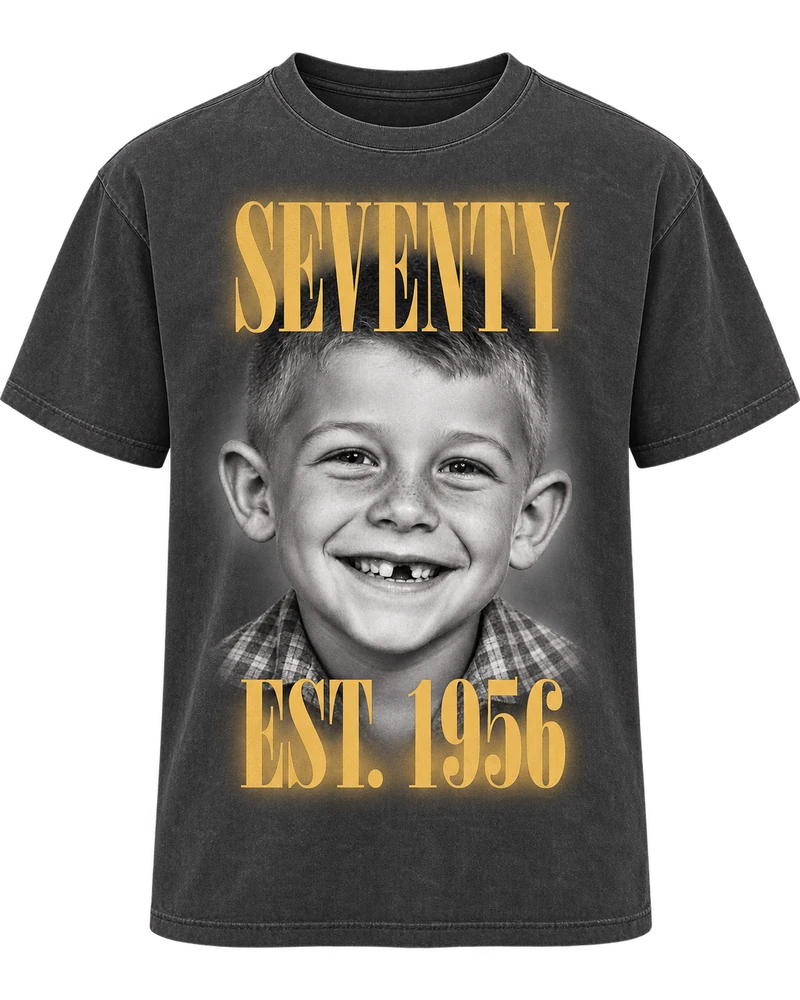
You can choose between two styles. Our vintage photo shirts tone one photo black and white under a tall headline, with text printed in clean white or antique gold. Our bootleg rap tees build a 90s-style collage of several faces or pet photos with chrome lettering. Depending on the garment, the print is DTF or DTG, done in the USA and shipped from here too. We have no minimum, so ordering a single shirt is completely normal.
A couple of examples of how this looks in practice: the anniversary shirt with a couple photo and est. year uses one picture, while the mom shirt with kids’ names and photos fits several.
Who it’s for
Ordering a printed photo shirt online tends to suit these shoppers better than a weekend with an iron:
- Someone who wants one good shirt of their own dog, kid or partner without buying in bulk
- Grown kids making a birthday or Father’s Day gift for a parent from an old family snapshot
- The relative organizing reunion or birthday-crew shirts in a dozen different sizes
- A girlfriend, boyfriend or spouse who wants their partner’s face on a gag gift
- Families wearing a loved one’s photo to a celebration of life
What kind of photo prints well on a shirt?
The photo matters more than the printer. A sharp, bright picture on a basic tee beats a dark, grainy one on the nicest shirt in the world. These are our photo requirements in plain words:
- Clear and well lit, with the face turned toward the camera.
- Phone photos are fine. A higher-resolution file prints sharper, so send the original rather than a copy.
- Faces and pets fully in the frame, with no foreheads, ears or chins cut off.
- For kids, a head-and-shoulders or waist-up photo in everyday clothes.
- Screenshots of social media posts, which are usually compressed and soft.
- Photos where the face is tiny in a big landscape.
- Swimsuit, bath or leotard photos of children. We won’t print these.
- Heavy filters or stickers covering part of the face.
Our full photo guidelines include more detail on group shots, old prints and pet pictures.
Can you improve a photo before uploading it?
Usually, yes, and you don’t need special software. A few minutes in your phone’s built-in editor solves most problems.
- Too dark: nudge brightness or exposure up a little. Pushing too far makes skin look flat.
- Too much background: crop closer, but keep the whole head in the frame.
- An old printed photo: lay it flat near a window in daylight and photograph it straight on, avoiding glare from overhead lights. A flatbed scanner is even better if you have access to one.
- Tilted horizon or head: straighten it so the face sits level.
- Blurry: editing won’t rescue real blur. Look for a different shot from the same day.
For a vintage photo tee, a strong, simple portrait works best, because the design tones the whole picture black and white. For a bootleg collage, variety helps: a few different shots of the same person or pet give the layout more to work with.
Can you put any picture on a shirt?
Not quite. We print photos of you, your family, your friends and your pets. We can’t print pictures of celebrities, rappers, athletes or other public figures, and the same goes for logos, brand names, anything carrying a sports team’s or league’s marks, and characters from cartoons or movies. Please stick to photos you took yourself or have clear permission to share. Should an order contain any of those, we’ll cancel it and refund every cent.
Photo shirt FAQ
What resolution does a photo need for a shirt?
There’s no exact number to hit, but bigger is better. Send the original photo straight from your phone or camera rather than a screenshot or a file saved from social media, which are usually compressed and print softer.
Can I use a phone photo?
Yes. Phone photos work well when they’re clear, well lit and front-facing. Upload the original file so the print comes out as sharp as possible.
Can I order just one custom photo shirt?
Yes. There’s no minimum order. Every shirt is printed one at a time with your photo, so a single shirt is a normal order for us.
Can I use an old printed photo?
Yes. Scan it, or photograph it flat in daylight without glare, then crop close. A sharp, evenly lit copy gives the best result, especially on a vintage photo design.
Does iron-on transfer paper work on dark shirts?
Only if you buy transfer paper made for dark fabric. Light-fabric paper is see-through, so a dark shirt shows through the image. Follow the pack’s mirroring and pressing instructions.
Skip the iron and the guesswork
Pick a design and upload your photo. The printing, packing and shipping are on us.
